
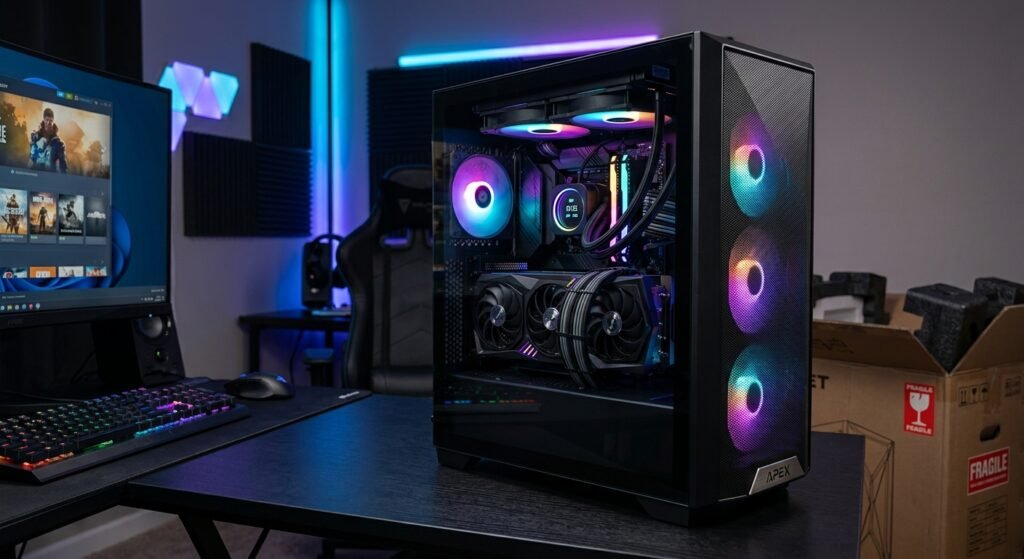
A Pre Built Gaming PC is a desktop computer assembled by a manufacturer or system builder before it reaches the buyer. The main components, such as the CPU, GPU, RAM, storage, motherboard, power supply, and cooling system, are installed as a complete system.
The main advantage is convenience: you do not need to select and assemble every component yourself. However, pre-built PCs can differ significantly in performance, cooling, upgradeability, and component quality. The exact specifications matter more than the word “gaming” in the product name.
This guide explains how pre-built gaming PCs work, their main components, benefits and limitations, and what to check before buying one.
What Is a Pre Built Gaming PC?
A Pre-Built Gaming PC is a ready-assembled desktop designed to run PC games and other software. “Pre-built” describes how the computer is supplied, not its performance level. A pre-built system can use entry-level, mid-range, or high-performance hardware.
For gaming, Intel recommends considering the CPU, GPU, RAM, storage, case, cooling, connectivity, and the requirements of the games you plan to play.
How Pre-Built Gaming PCs Are Assembled
A manufacturer or system builder installs compatible components into the case, connects the internal hardware, installs the cooling solution, and may install an operating system and other software. The exact components and assembly methods vary by manufacturer and model.
Who Is a Pre-Built Gaming PC Best For?
A Pre Built Gaming PC can be useful for beginners, gamers who do not want to build a computer themselves, and users who value convenience or manufacturer support. It can also suit experienced users when a particular configuration offers the performance, price, warranty, and upgrade options they need.
How a Pre Built PC Differs From a Custom-Built PC
With a custom-built PC, the buyer has greater control over individual components. With a pre-built system, the manufacturer or system builder selects and assembles the configuration.
Intel describes pre-built PCs as an option for users who value convenience and do not need the same level of component choice offered by custom or DIY systems.
How Does a Pre Built Gaming PC Work?
A Pre-Built Gaming PC works like other desktop computers. The CPU processes instructions, the GPU handles graphics workloads, RAM provides temporary working memory, and storage holds the operating system, games, applications, and files. The motherboard connects these components, while the PSU supplies electrical power.
How the CPU Processes Game Data
The CPU executes instructions and handles many tasks involved in running games and applications. Its importance varies by game and workload. Games that place heavier demands on the processor may benefit more from stronger CPU performance.
How the GPU Renders Graphics
The GPU processes and renders graphics for games and other visual workloads. For modern gaming, the GPU is a major performance consideration, particularly when targeting higher resolutions, graphics settings, or frame rates. Intel recommends paying close attention to CPU and GPU specifications for these use cases.
How RAM Supports Gaming Performance
RAM provides temporary working memory for the operating system, games, and applications. The amount required depends on the games and other programs you use. Intel currently describes 16 GB as a common starting point for modern gaming PCs, while more memory can be useful for heavier multitasking, streaming, or other demanding workloads.
How Storage Affects Loading Times
Storage holds games, applications, operating-system files, and personal data. SSDs generally provide faster data access than traditional HDDs and can reduce loading times. Intel recommends SSD storage for modern pre-built gaming systems where possible.
How the Power Supply Supports the Components
The power supply unit (PSU) supplies electrical power to the computer’s components. When buying a Pre Built Gaming PC, check the PSU capacity and available connectors. This becomes especially important if you may install a more power-hungry graphics card later.
Why Cooling and Airflow Matter
CPU and GPU components generate heat during operation, particularly under gaming workloads. CPU coolers, GPU cooling systems, case fans, heatsinks, and case airflow work together to manage that heat. Intel notes that cooling becomes increasingly important as hardware becomes more powerful.
What Components Are Inside a Pre Built Gaming PC?
A typical Pre Built Gaming PC includes several major components, although the exact configuration varies.
CPU (Central Processing Unit)
The CPU executes instructions and handles general computing tasks. When comparing systems, check the exact processor model rather than relying on descriptions such as “fast processor” or “high-performance CPU.”
GPU (Graphics Processing Unit)
The GPU handles graphics processing and rendering. For a gaming computer, the exact GPU model is one of the most important specifications to examine because graphics performance depends heavily on the GPU’s capabilities.
RAM (Memory)
RAM provides temporary working memory for active programs and games. Check the total capacity, configuration, supported memory type, and available upgrade slots.
SSD and Other Storage
Storage retains data when the computer is turned off. Modern gaming PCs commonly use SSDs because they offer faster data access than traditional HDDs. Consider both capacity and storage technology when comparing systems.
Motherboard
The motherboard provides the connections between the CPU, RAM, storage, GPU, and other components. Its sockets, slots, interfaces, and firmware support can affect future upgrade options.
Power Supply Unit
The PSU provides electrical power to the system. Check its capacity, connectors, and compatibility with the installed hardware and potential future upgrades.
CPU Cooler and Case Fans
The CPU cooler removes heat from the processor, while case fans help move air through the case. Cooling requirements vary according to the CPU, GPU, case design, and overall system configuration.
PC Case
The case protects the internal hardware and affects airflow, component clearance, expansion, and maintenance. A larger case can sometimes provide more room for components and future upgrades, while compact systems may have tighter physical limitations.
Key Features of a Pre Built Gaming PC
The features of a Pre Built Gaming PC depend on the manufacturer and configuration.
Ready-to-Use Configuration
The main hardware is already assembled, so the buyer does not need to build the system from individual components. Some initial software configuration may still be required after delivery.
Pre-Installed Operating System
Many pre-built computers include an operating system, but this should be confirmed in the product specification.
For Windows 11, Microsoft’s current minimum requirements include a compatible 64-bit processor with at least two cores, 4 GB of RAM, 64 GB of storage, UEFI Secure Boot capability, TPM 2.0, and compatible DirectX 12 graphics. These are minimum operating-system requirements, not recommended gaming specifications.
Gaming-Oriented Hardware
Gaming PCs generally use hardware selected for game workloads, often including a dedicated GPU, capable CPU, sufficient RAM, suitable storage, and appropriate cooling. However, “gaming PC” is not a standardized performance rating. Always check the actual hardware.
Different Performance Levels
Pre-built systems are available at many performance levels. The right system depends on the games you play, target resolution, graphics settings, desired frame rate, and budget.
Connectivity and Expansion Options
Check the available USB ports, display outputs, networking, audio connections, memory slots, storage connections, and expansion slots. Intel specifically recommends checking connectivity when selecting a pre-built gaming PC.
Upgrade Potential
Some pre-built systems use standard components and provide reasonable upgrade flexibility. Others use compact layouts or proprietary components that can limit upgrades. Always check the exact model before assuming a particular component can be replaced.
Benefits of a Pre Built Gaming PC
Convenient and Easy to Set Up
The major hardware has already been assembled, reducing the work required to get the computer running.
Saves Time and Assembly Effort
You avoid much of the component selection, physical installation, cable management, and initial troubleshooting involved in building a PC.
No Need to Build the PC Yourself
This makes a Pre Built Gaming PC attractive to people who want to game without learning how to assemble a desktop computer.
Manufacturer Warranty and Support
Many pre-built systems come with manufacturer warranty and support, although the coverage and service process vary by product.
Multiple Hardware Configurations
Manufacturers often sell different combinations of CPUs, GPUs, RAM, storage, and other components.
Suitable for Different Gaming Budgets
Pre-built systems are available at different performance levels. Intel recommends starting with the games you want to play and comparing their requirements with the hardware in the system.
Disadvantages of a Pre Built Gaming PC
Less Customization Than Building Your Own PC
A custom PC generally gives the buyer more freedom to select individual components. Pre-built systems offer a predetermined or limited range of configurations.
Component Quality Can Vary
Two computers with similar CPUs and GPUs can still differ in motherboard, PSU, RAM configuration, storage, cooling, and case quality.
Some Systems May Have Limited Upgrade Options
Compact cases, limited motherboard slots, proprietary components, or restricted power supplies can make future upgrades more difficult.
Potentially Higher Cost Than Selecting Individual Components
A pre-built PC’s price can include assembly, testing, warranty service, support, distribution, and other costs.
Proprietary Parts in Some Pre Built Systems
Some manufacturers use proprietary or non-standard components. These designs can affect replacement and upgrade options, so check the exact specifications before buying.
Pre Built Gaming PC vs Custom-Built PC
Cost and Overall Value
Compare the complete hardware, price, warranty, support, and upgrade potential. The cheapest purchase price does not necessarily represent the best overall value.
Hardware Selection
Custom builds provide greater freedom to select individual components, while pre-built PCs offer configurations selected by the manufacturer or system builder.
Gaming Performance
Gaming performance depends on the actual hardware configuration and software workload. A pre-built PC is not inherently slower than a custom PC simply because it was assembled by a manufacturer.
Customization
Custom PCs generally offer greater control over component selection, case design, cooling, and appearance.
Ease of Setup
Pre-built PCs have a clear advantage in convenience because the main hardware assembly is already completed.
Upgradeability
Upgradeability depends on the motherboard, case, PSU, connectors, available slots, firmware, and manufacturer design.
Warranty and Technical Support
A pre-built system may provide centralized manufacturer support. With a custom PC, warranty coverage can involve individual component manufacturers depending on how the system was purchased.
How to Choose the Right Pre-Built Gaming PC
Choosing the right Pre Built Gaming PC should start with the games and performance you want rather than the product’s marketing name.
Start With Your Gaming Budget
Set your budget and determine whether it must also cover a monitor, keyboard, mouse, headset, or other accessories. Then consider your target resolution, graphics settings, and frame-rate expectations.
Choose the Right CPU
Check the exact CPU model, not just its advertised clock speed or core count. Consider the games and other workloads you expect to run, including streaming or multitasking if relevant.
Select a Suitable GPU
The GPU deserves close attention because it has a major effect on graphics performance. Match it to your monitor’s resolution and refresh rate and the games you intend to play. Higher resolutions and refresh rates generally increase graphics demands.
Check RAM Capacity
For a modern gaming system, 16 GB is a useful starting point, but the appropriate amount depends on the games and applications you use. Intel notes that more memory can be useful for heavier multitasking and demanding workloads. Also check whether the motherboard has available memory slots for future expansion.
Choose Enough Storage
Look at both capacity and storage type. An SSD is generally preferable for a modern gaming system because it provides faster data access than an HDD. Make sure there is enough capacity for your operating system, games, and applications.
Check the Power Supply
Check the PSU’s capacity and connectors. If you may upgrade the GPU later, make sure the system has enough power capacity and the appropriate connections for the planned hardware.
Consider Cooling and Airflow
Review the CPU cooler, GPU cooling, number of case fans, ventilation, and overall case design. More powerful hardware generally requires greater attention to thermal management.
Check the Motherboard and Upgrade Options
Look for available RAM slots, storage interfaces, expansion slots, supported processors, and physical clearance for future hardware.
Review the Full Component Specifications
Never choose a Pre-Built Gaming PC based only on phrases such as “gaming desktop” or “high-performance PC.”
Check the exact CPU, GPU, RAM, storage, motherboard, PSU, cooling, case, operating system, warranty, and included accessories.
Choosing a Pre Built Gaming PC for Different Resolutions
Resolution affects how much graphical work the GPU must perform. However, there is no universal GPU or PC specification that guarantees a particular frame rate in every game.
1080p Gaming
1080p uses fewer pixels than 1440p and 4K, so it generally requires less GPU rendering work. The appropriate hardware still depends on the specific game, graphics settings, refresh rate, and desired frame rate.
1440p Gaming
1440p renders more pixels than 1080p, increasing the graphical workload. When choosing a Pre Built Gaming PC for 1440p, pay particular attention to the GPU and compare its capabilities with the games you plan to play.
4K Gaming
4K renders substantially more pixels than 1080p or 1440p. Demanding 4K gaming therefore places greater graphics demands on the system, making GPU selection especially important.
Why Resolution and Graphics Settings Matter
Resolution is only one part of gaming performance. Graphics quality settings, refresh rate, CPU performance, GPU capability, drivers, and the game itself can all affect the final result. Intel recommends matching hardware to the intended resolution and performance target.
What Games Can You Play on a Pre Built Gaming PC?

The games a Pre Built Gaming PC can run depend on its exact hardware. The most reliable approach is to compare the system’s specifications with the minimum and recommended requirements published for each game.
Esports and Competitive Games
Many competitive games are designed to work across a range of hardware, but requirements vary by title. If you want very high frame rates for a high-refresh-rate monitor, stronger CPU and GPU hardware may be necessary depending on the game.
Modern AAA Games
Modern AAA games can place substantial demands on CPU and GPU resources. Before buying, check the game’s official system requirements rather than assuming a PC labeled “gaming” will run every new title at high settings.
Open-World and Multiplayer Games
Requirements vary considerably between games. World size, player count, game engine, graphics settings, resolution, and other factors can affect hardware requirements.
How Hardware Affects Game Performance
CPU, GPU, RAM, storage, resolution, graphics settings, drivers, and software configuration can all contribute to gaming performance. For this reason, comparing the complete PC specification with your intended games is more reliable than relying on marketing labels.
Can You Upgrade a Pre Built Gaming PC?
Yes, many pre-built computers can be upgraded, but the available upgrades depend on the specific system. Intel notes that RAM, storage, and sometimes GPUs can be upgraded on suitable desktop configurations, but upgrade difficulty varies by design.
Upgrading RAM
RAM can often be upgraded if compatible slots and supported memory are available. Check the motherboard’s maximum supported capacity, memory type, and available slots before purchasing additional RAM.
Adding or Replacing Storage
Many desktop PCs support additional or replacement storage through M.2, SATA, or other interfaces. Check the exact motherboard and case specifications before buying a new drive.
Upgrading the Graphics Card
A GPU upgrade requires sufficient physical clearance, motherboard compatibility, suitable power connectors, and an adequate PSU. The case’s airflow and cooling capability should also be considered.
Upgrading the Power Supply
A PSU replacement must fit the case and provide the necessary power and connectors. Some proprietary systems can make this upgrade more difficult.
When a CPU Upgrade May Be Possible
CPU upgrades depend on the motherboard socket, chipset, firmware support, power delivery, cooling, and manufacturer compatibility. A processor that physically fits the socket is not automatically guaranteed to work.
Why Compatibility Should Be Checked First
Before upgrading a Pre-Built Gaming PC, verify the component’s physical dimensions, interface, power requirements, motherboard support, firmware requirements, and cooling needs.
How Long Does a Pre Built Gaming PC Last?
There is no universal lifespan for every gaming PC. A computer can remain operational for many years while becoming less capable of running newer games at the settings you want.
Factors That Affect PC Lifespan
Component quality, usage, operating temperatures, maintenance, workload, and changing software requirements all influence useful life.
Hardware Aging and Newer Games
Hardware does not automatically become unusable when newer components are released. Instead, older hardware may gradually become less capable of meeting the requirements of newer games.
Signs That Your Gaming PC Needs an Upgrade
Possible signs include consistently missing your desired frame rate, insufficient storage, inadequate memory for your workload, or difficulty meeting newer game requirements.
How Maintenance Can Help Extend Its Useful Life
Keeping ventilation clear, maintaining reasonable airflow, cleaning dust from the system, and monitoring operating conditions can help maintain normal hardware operation.
Common Mistakes to Avoid When Buying a Pre Built Gaming PC
- Choosing a PC Based Only on the CPU: A powerful CPU does not automatically mean strong gaming performance. The GPU and the rest of the system also matter.
- Ignoring the GPU: For graphics-heavy games, the GPU is one of the most important components to evaluate.
- Buying Without Checking the Power Supply: Check the PSU capacity and connectors, particularly if you may upgrade the GPU later.
- Overlooking Cooling and Airflow: Do not evaluate only the CPU and GPU. Check the cooler, fans, case ventilation, and overall thermal design.
- Not Checking Upgrade Compatibility: Do not assume that any future GPU, RAM kit, storage drive, or PSU will work. Check the motherboard, case dimensions, connectors, power requirements, and manufacturer documentation first.
- Focusing Only on Storage Capacity: Capacity is important, but storage type also matters. An SSD generally provides faster data access than a traditional HDD, while sufficient capacity ensures you have room for your games and applications.
How to Check the Specifications of a Pre-Built Gaming PC

Before buying a Pre Built Gaming PC, review the complete technical specification.
Check the Exact CPU and GPU Models
Exact model numbers provide much more useful information than descriptions such as “gaming processor” or “dedicated graphics.”
Verify RAM and Storage
Check RAM capacity and configuration, storage type and capacity, and available expansion options.
Review the PSU Specifications
Check the rated capacity and available connectors. If the manufacturer provides the exact PSU model, use that information when comparing systems.
Check Cooling and Case Design
Review the CPU cooler, GPU cooling, case fans, ventilation, and physical space for components.
Look at Available Ports and Expansion Slots
Check USB ports, display outputs, networking, audio, RAM slots, storage connections, and PCIe expansion options according to your needs.
Review Warranty and Support Information
Warranty length, coverage, repair procedures, and technical support vary between manufacturers and products. Read the actual warranty terms before buying.
Read Also: Timebears com Website Review 2026: Features and Details
Is a Pre Built Gaming PC Worth It?
For many buyers, a Pre Built Gaming PC can be worthwhile because it combines assembled hardware with convenience.
When a Pre Built PC Makes Sense
A pre-built system can make sense if you:
- Want a computer that is already assembled
- Do not want to build the system yourself
- Prefer manufacturer support
- Find a configuration that matches your games and budget
When a Custom-Built PC May Be Better
A custom PC may be better if you want:
- Maximum control over component selection
- Specific motherboard, case, or cooling choices
- Greater flexibility when selecting individual upgrades
- A highly customized appearance or configuration
Factors to Consider Before Making a Decision
Before buying, consider your budget, games, target resolution, desired frame rate, CPU, GPU, RAM, storage, PSU, cooling, upgrade options, warranty, and available space. The best choice is the system that meets your actual requirements without paying for hardware you do not need.
Final Thoughts
A Pre Built Gaming PC can be an efficient way to start PC gaming without assembling a computer yourself. Its main advantage is convenience, but the term “gaming PC” does not define a specific performance level.
The most important step is to examine the actual hardware. Start with the CPU and GPU, then check RAM, storage, PSU, cooling, motherboard, connectivity, upgrade options, and warranty.
Finally, compare the complete system with the games you want to play, your target resolution, desired frame rate, and budget.
A carefully selected pre-built system can save assembly time while providing the hardware needed for your gaming goals. The key is to compare specifications rather than relying on marketing labels.
FAs About Pre Built Gaming PCs
Are pre-built gaming PCs good for beginners?
Yes. A Pre Built Gaming PC can be convenient for beginners because the main internal hardware has already been assembled.
Are pre-built gaming PCs good for gaming?
They can be. Gaming performance depends on the actual hardware configuration, not simply whether the PC was assembled by a manufacturer.
Can you upgrade a pre-built gaming PC?
Often, yes. RAM and storage may be relatively straightforward to upgrade, while GPU, PSU, and CPU upgrades depend on the system’s compatibility and design.
How long does a pre-built gaming PC last?
There is no fixed lifespan. Its useful gaming life depends on its hardware, maintenance, and the requirements of newer games.
Do pre built gaming PCs come ready to use?
They arrive assembled, but the amount of software setup varies. Check whether the operating system and other required software are included.
Is a pre-built gaming PC better than a custom PC?
Neither is universally better. Pre-built systems emphasize convenience, while custom PCs provide greater control over component selection.
Can a pre-built gaming PC run modern games?
It depends on the hardware and the particular game. Compare the system’s exact specifications with the game’s published requirements.
What should I check before buying a pre built gaming PC?
Check the exact CPU, GPU, RAM, storage, motherboard, PSU, cooling, case, operating system, warranty, connectivity, and upgrade options.